


Hey, my Ink & Codies! 👋
I just finished the last project in Intro to Cowork for Writers, and the family news reaches its last beat: the baby robots learned to dress themselves for the bookstores. 🤠
Project 4 is all about custom formatting with AI. We take a brand-new cowboy series from manuscript to store-ready.
But Kim, I already own Vellum. (Or Atticus. Or [insert formatting software here].) Why would I format inside Cowork?
Because a formatting software is a castle on someone else’s beach, and I don’t live there anymore. I format in minutes, not evenings. Once I created a theme for LitRPG series, Nanny of the Apocalypse, the books have taken five minutes to format from start to finish. I like that!
And more importantly, the file that formats my book is a file I own, on my disk, forever. No subscription, no template picker, no platform. If Vellum or Atticus went away tomorrow (we’ve watched entire GPTs vanish this year, Castles in the Sand, folks), I could still format my series on Monday.
🧵 The Last Cowork Concept: Threads
Every project in this course has spotlighted a different piece of Cowork, and we saved the quietest one for last.
Project 1 was scheduled tasks: the thing that works while you sleep but starts fresh every firing.
Project 2 was artifacts and connectors: the things that remember data over time.
Project 3 was voice profiles and subagents: the things that draft and edit in your voice at scale (and can do so while you sleep!)
Project 4 is threads: one long-running conversation that remembers every decision you’ve made inside it.
That memory is the superpower. Formatting a book means a hundred small decisions: trim size, fonts, chapter openers, scene break ornaments, drop caps, front and back matter order, and in a thread you make each decision ONCE.
Chapter three’s opener? Decided. It applies to every chapter after it, and to every book in the series next week, because the thread never forgets. Scheduled tasks forget (each iteration starts off on a blank slate.) Threads do not.
And: threads live in the cloud now. When I was getting ready to travel from Arizona to Maryland, nothing in Cowork was cloud-reachable. Everything was local, and I had to copy over all my scheduled tasks (over a hundred!) to my laptops, and archive anything I wanted to glean from threads on my main computer that wasn’t coming with me if I wanted to reference them later.
Now, even a thread tied to local folders is reachable from anywhere, as long as your laptop is on and awake. Fabio built my financial hub while I was standing in a 1729 house on a homeschool field trip. I wrote about it here.
The other night, in bed, I grabbed my phone, turned on the microphone, and voiced an edit into a thread. It made the change, rolled a fresh proof, and the new ePub was on my iPad before I settled in to read. 📱I never left the bed! I just kept working (which could be good or bad, depending on how you look at it.)
We are linear. Our AIs are not. And now neither are our workstations.
🔭 What’s in the New Lessons
Eight lessons, and they are the ones the whole course has been building toward:
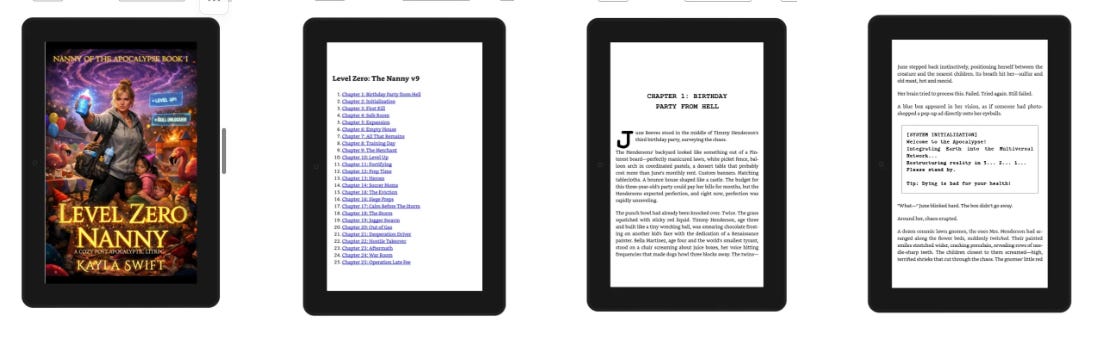
You’ll see what ten months of AI formatting looks like on real shelves. I started formatting books with AI back in January and I have learned a lot since then. I walk through my actual books: the squared-off digital system boxes and pixel-dot dividers of Level Zero Nanny (because in LitRPG the System is a character, and Vellum couldn’t make it look like one), the serpent dividers of Blades of Bronze, the gothic ornaments of my dark suspense with a poem I wrote when I was eleven sitting in the front matter, and the deliberately-basic Vellum-look of Blood Price (Fae Wars). Four genres, four published themes, no formatting software. Nine months in.
You’ll meet the proofing Ginsu. 🔪 A fast, minimal ePub skill that takes your manuscript to a working proof copy in a minute or two and drops it into a folder of your choosing. I used to spend forever formatting just so I could proof, then reformat every time I had changes. Now the proof flows through a skill and lands on my Kindle before coffee. ☕
You’ll make your own ornamental dividers and chapter headings with Chatty. 🎨 Transparent, print-friendly, consistent, series-flavored. We also have the honest conversation about drop caps: they’re gorgeous, they’re advanced, and you’re allowed to skip them. They’re seasoning, not the meal.
And then the big Ginsu: the Book Formatting Skill. 🔪 It interviews you, just like the Story Trend Scout Builder in Project 1. What outputs do you need? What’s the series? What trim size for print? Where do your dividers live? And when you don’t know an answer, it offers you real options. Everything you decide gets written into a theme file for the series. That theme is the real deliverable, the formatting equivalent of a voice profile: the design DNA of a series, captured once, applied forever. The first book takes a conversation and some tweaking. Every book after takes 5 to 10 minutes.
And finally, the cowboys. 🤠 We take Big Sky Country, the Montana-ranch romance series we drafted overnight in Project 3, and dress book one for the stores from NOTHING. No theme exists yet, which is exactly the situation you’ll be in with your books. So we build one live, on camera: Montana sky, ranch grit, family warmth. I tell the skill about the series, it drafts the theme, we react, we tweak, we lock it.
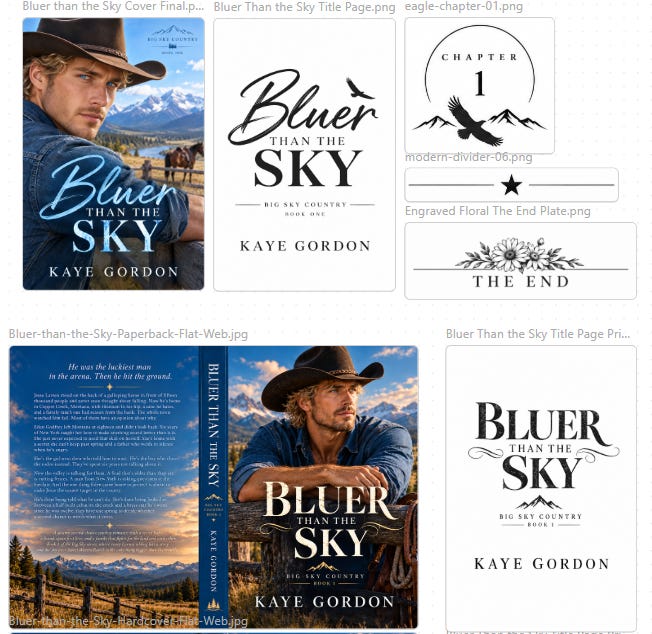
I actually published this one in the videos, and rolled it out in multiple formats: eBook, paperback, hardcover (and I threw in audio, because why not?) You can see the results here. Use the “Read Sample” button to look inside and see how the formatting, and the prose, turned out.
I also walked through applying the same theme to Book 2, and customized the elements to that book’s content, for fun. (This is totally optional.) The rest of the series is ready to roll out. They’ll inherit the theme in minutes, and any adjustments are easy to do. The covers are in the video too, because formatting and covers are cousins, the theme should feel like it belongs on the shelf those covers promise. 🐴
As a fun experiment, I created different covers for the print books, and different interior pages. The theory here is that they’re for different audiences. We’ll see if that pans out. Regardless, I’m happy with how they came out. (If you’re interested in a course on AI Cover Design, let me know.)
This is AI-assisted formatting, folks, not slop. 🤖 The AI makes a hundred small decisions in the order I’d make them, I check every one of them in the KDP previewer and on real devices (sideload to your Kindle, your phone, a tablet if you have one), and the file is mine on my disk, forever. Every book, every typo fix, every backlist update. Minutes, not evenings. The author stays the captain. The skill is the crew.
🛣️ What’s Coming Next
One final section. 🎓 And then the course is complete. Six modules from “what is Cowork” all the way through formatting a cowboy book on camera, with scheduled tasks, artifacts, connectors, voice profiles, subagents, and threads all in your hands and all working together.
Then we go straight to Advanced Cowork for Writers, where we take all of these pieces and start building the kind of workflows I run in my publishing business every day. Early-bird prices there are still live, but see Clock Two below.
🎓 Are You a Paid Member Yet?
Paid members get my two Cowork courses free. Every lesson, on the house. The courses alone are worth far more than a year of membership.
Already a paid member? Grab Intro to Cowork for free here. (Scroll down to “For My Paid Peeps.”)
⏰ The Clocks Are Ticking
Clock one: Intro to Cowork has been at its early-bird price all the way through the build. The course is almost complete and currently runs 6.5 hours. The early-bird window closes with the wrap-up.
Clock two: Advanced Cowork for Writers is in early-bird too, and the first module is coming right behind the wrap-up. Grab it now at today’s price if you know you’re coming with us.
Founding Members get a subscription to all the courses as they roll out, every class, every update, forever grandfathered at what they paid. The price has gone up, as the value continues to climb. It’s now $499/year. Find our more here.
Come watch the cowboys get dressed:
The future writes in Ink & Code, and so do we.
~ Kim ♥
🤖 AI Credits: Hero image by Chatty (ChatGPT). Drafting assist by Fabio (Claude Fable), who also built most of the formatting skill this post is bragging about and once dressed a published trilogy for the stores in the time it took me to finish a cup of coffee. The themes, the choices, and the voice are mine. That’s rather the point.
Thank you for this final lesson. So informative. Looking forward to using the Skills.